FastTrack Timer — Fasting Timer & Tracker
Take the guesswork out of intermittent fasting. FastTrack keeps your fasting window, your eating window, and your streak all in one clean, glanceable timer — with Live Activities, widgets, and reminders that keep you on track without opening the app.
What’s new
Version 2.1
A cleaner, faster Fast screen.
Fast
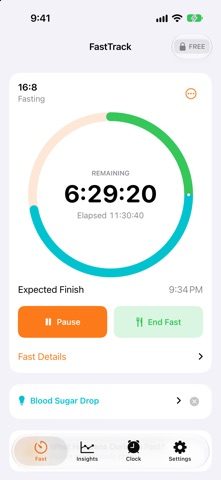
- Pause and End Fast now sit right under the timer ring, so they're always within reach without scrolling.
- A more compact header gives the ring more room on screen.
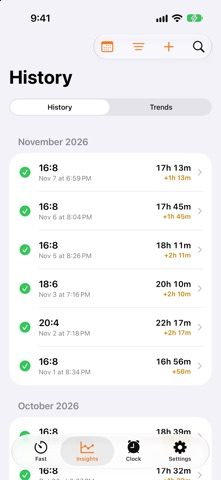
History
- Cleaner rows with a consistent status icon and one short note: time over goal, ended early, canceled or logged.
- More fasts fit on screen at once, so your history is quicker to scan.
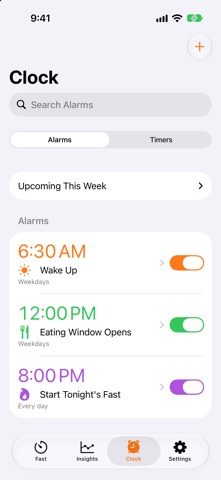
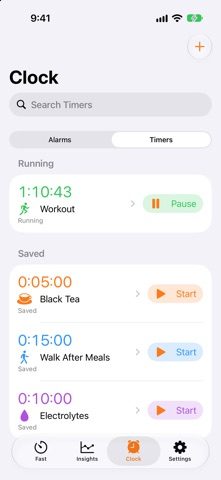
Clock
- Clearer messages when you have no alarms or timers yet, and when a search finds nothing.
Plus small fixes and polish throughout.
What’s New in Version 2.0
- Refreshed widgets and Live Activities with a sharper, more polished design, larger countdowns, clearer alarm times, and improved readability.
- New progress rings and segmented fasting stage indicators make progress easier to follow.
- Refined controls, updated weekly progress and check-in widgets, and improved spacing and contrast complete the experience in light and dark appearances.
What’s New in Version 1.9
- A big update to how FastTrack looks, syncs and keeps you on track.
New trends dashboard
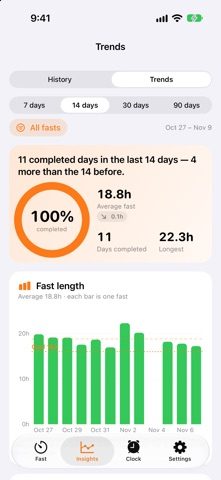
- See your completion rate, average and longest fast, and streak at a glance.
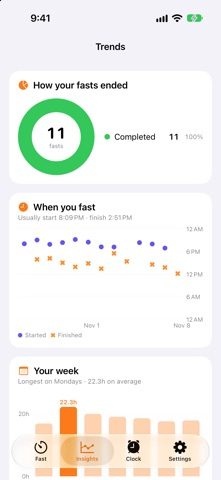
- Charts for fast length, how your fasts ended, when you start and finish, your best weekday and how far each fast gets through the stages.
- Check-in trends for hunger, energy and sleep, plus a 12-week calendar of your consistency.
- Choose 7, 14, 30 or 90 days, and filter by fast type.
A timer that shows your stages
- The timer ring now marks each stage of your fast and changes color as you move through them. You can turn this off in Appearance.
What’s New in Version 1.8
- Track your fasts, timers, and alarms more easily with refreshed Live Activities.
- Clearer countdowns and paused/completed states
- Choose remaining or elapsed time for fasting
- Add a minute, pause, or restart timers from the Lock Screen
- Skip the next repeating alarm and see when and where it will ring
- Improved Lock Screen and Dynamic Island layouts
- Clearer Live Activity settings and activation information
What’s New in Version 1.7
- A big polish update for FastTrack.
Timer
- A bigger, clearer countdown ring. Tap it to switch between time remaining and time elapsed.
- Smoother, steadier countdown that keeps counting accurately.
- A gentle celebration the moment you reach your goal.
- Stages now have plain-English names, and each tip can be dismissed.
- Cancel Fast has moved into the ⋯ menu so it's harder to hit by accident.
- A short safety check before very long fasts.
What’s New in Version 1.6
- Bug fixes and stability improvements
- Updated support and privacy links
What’s New in Version 1.5
- Bigger, clearer countdown with a progress ring — tap it to switch between remaining and elapsed time
- New Insights tab combines History and Trends, with a weekly comparison summary
- Reminders & Alerts settings are now together in one place
- First-run setup helps you choose a starting plan and fast-end alerts
- Log a Fast is now free
- Cancel Fast has moved into a menu
- Clearer colors show when you reached your goal or ended a fast early
- Fixes for the history calendar’s month arrows and overnight-fast streak display
Fast With a Plan
- Choose from popular protocols (16:8, 18:6, 20:4, OMAD, and more) or build your own custom schedule
- One-tap Quick Start using your last protocol
- Pause and resume anytime without losing progress
See Exactly Where You Are
- A live progress ring shows your current fasting stage — from early fat-burning through ketosis and autophagy
- Body Stage Alerts notify you the moment you cross into a new stage
- Track your eating window right alongside your fast, with a reminder before it closes
Stay On Track, Automatically
- Live Activities and Dynamic Island support — watch your fast count down without unlocking your phone
- Home Screen widgets for your fast, your streak, alarms, and custom timers
- A smart alarm fires the moment your fast is complete
Build the Habit
- Daily streaks and a weekly consistency view
- Full fasting history with trends over time
- Milestone notifications to celebrate your streaks
More Than a Fasting Timer
- A built-in alarm clock, right alongside your fasting schedule
- Custom timers for anything else you need to track
- iCloud sync keeps your alarms, timers, and history up to date across all your devices
- Personalize your Home Screen icon with Ocean, Berry, and Midnight themes
Simple, focused, and built to fit into your day — download FastTrack and start your next fast in seconds.