TaskFlow Studio: because your to-do list was getting a little too confident.
Your tasks, calendar, and notes finally agreed to sit at the same table. TaskFlow Studio is built on Apple Reminders and Calendar, so everything stays in sync with the apps you already use, and it adds the planning tools those apps leave out.
It looks and feels like it belongs on your iPhone and iPad, because it does. Standard iOS lists, familiar gestures, and no learning curve. Productivity apps should help you do the work, not become the work.
Plan your day
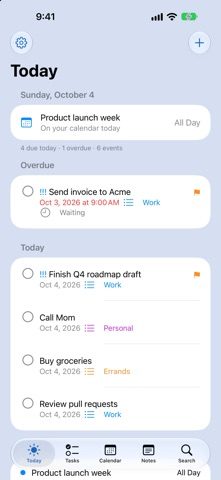
- Today brings together overdue tasks, today’s tasks, your calendar, and tomorrow.
- Suggested surfaces flagged and high-priority work — swipe right to commit it to today.
- Swipe left on overdue tasks to move them to tomorrow, for when today has other plans.
Capture and edit fast
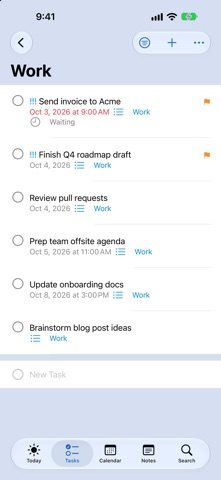
- Add tasks inline at the bottom of any list, then keep typing.
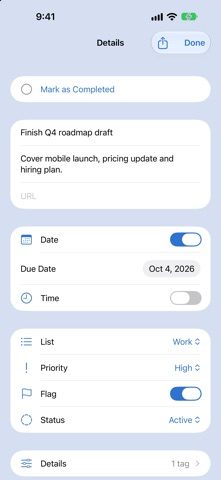
- Tap a task to edit it in place — changes save automatically.
- Quick Capture turns “call the dentist Friday at 9” into a task or event.
- Shake to undo when your thumb gets ahead of your brain.
Organize your way
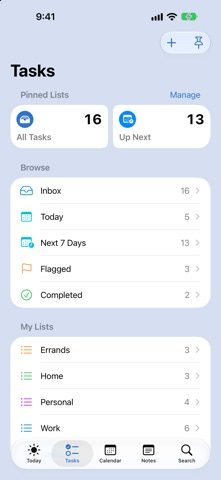
- Lists, smart lists, pinned lists, flags, priorities, and tags.
- Subtasks, dependencies, comments, notes, attachments, and location alerts.
- Show any list as rows or columns.
- Filter and sort by status, priority, due date, or tag.
List Types
Not every list works the same way. Your lists shouldn’t have to, either.
A shopping list needs quantities and categories. A project needs stages, milestones, and dependencies. A packing list helps you see what’s ready to go. A Watch Later list needs show details, episode progress, and upcoming releases.
TaskFlow’s List Types give each list the tools that fit its purpose. Instead of squeezing everything into a basic checklist, you can organize the details that matter and take useful actions right where you need them.
- Shopping: Organize items by category and aisle, track quantities, and keep your shopping trip focused.
- Read & Watch Later: Save articles, videos, movies, and shows with previews and direct links. Track episodes and keep up with upcoming releases.
- Projects: Group tasks by section or milestone and connect dependencies so you know what can happen next.
- Packing: Organize items by category and track what’s packed.
- Bills: Keep amounts, due dates, and payment status together.
- Routines: Follow repeatable steps with timing where it helps.
- Standard lists: Keep things simple when all you need is a checklist.
The idea is simple: choose a list type that matches what you’re trying to do. You get a clearer view, more useful details, and fewer steps between organizing something and getting it done.
Tasks and calendar, together
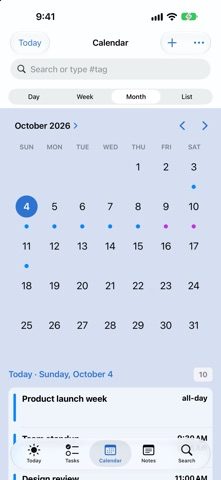
- Day, Week, Month, and List views show your events and due tasks side by side.
- Create and edit events with Apple’s own Calendar editor.
- Tag events and see everything due on any day at a glance.
Find anything
- Search tasks, notes, events, comments, and tags.
- Type # to jump straight to a tag.
Notes
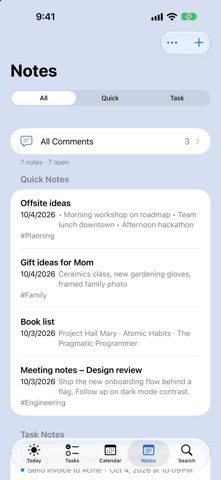
- Quick notes for ideas, checklists, and drawings, with tags.
- Every task comment in one place.
Notes on the web Beta
TaskFlow Web Notes brings your notes to any browser. Sign in with the same Apple Account you use in TaskFlow — everything syncs through your own iCloud, with no separate account and nothing stored on our servers.
- Read, write, and format notes from any device with a browser.
- Rich text with headings, lists, checklists, quotes, and links.
- Two-way sync with TaskFlow on iPhone, iPad, and Mac.
Try TaskFlow Web Notes →
Sync your notes once in the TaskFlow app to enable browser access.
At home on your device
- Home Screen widgets for Today, Up Next, Agenda, High Priority, and smart lists — complete tasks right from the widget.
- Quick Capture in Control Center, on the Lock Screen, or on the Action button.
- Optional Live Activity with today’s tasks on the Lock Screen.
- Focus filters show only the lists that matter right now.
- Siri and Shortcuts support for adding, completing, and finding reminders.
- A full iPad layout with a sidebar, drag and drop, and side-by-side details.
Great for
Daily planners, Reminders power users, calendar-driven work, and anyone juggling home, health, family, and work lists. Also people who love tags a normal amount.
TaskFlow Studio helps your tasks go from “I should remember that” to “handled.” Finally. Mostly. Tomorrow also exists.
 $4.99