← Back to apps
PhotoFlow Studio app icon

PhotoFlow Studio

Organize, Edit & Rediscover Your Photos

Download on the App Store $4.99
PhotoFlow Studio screenshot 1 PhotoFlow Studio screenshot 2 PhotoFlow Studio screenshot 3 PhotoFlow Studio screenshot 4 PhotoFlow Studio screenshot 5 PhotoFlow Studio screenshot 6
Version
1.3
Price
$4.99
Category
Photo & Video
Age rating
4+
Compatibility
iOS 18.0 or later
Seller
Michael Surratt

Your best photos deserve more than a place in your camera roll.

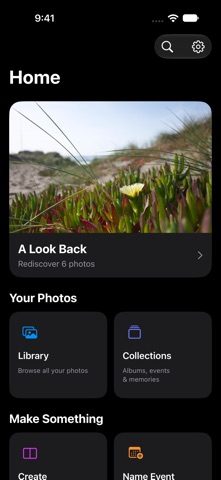
PhotoFlow Studio helps you organize, edit, and rediscover your photo library. Find a favorite moment, bring out the details in a beautiful shot, compare memories from different years, or work through a crowded camera roll — one manageable session at a time. Built for iPhone and iPad, PhotoFlow Studio brings browsing, creative tools, and thoughtful cleanup into one place.

Features

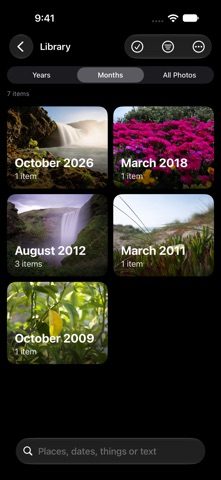
  • Find the moment — browse your library by year, month, or individual photo, narrow it down to photos, videos, favorites, and screenshots, and search by dates, places, keywords, recognized subjects, or text found in your images.
  • Explore on a map — revisit trips and discover moments you may have forgotten.
  • Make your library feel organized — star ratings, picks, color labels, and keywords; albums and smart collections that update as your library changes; name meaningful days and events so memories are easier to recognize and revisit.
  • Clear the clutter with confidence — find exact duplicates, similar shots, screenshots, large files, and photos that may be blurry or dark, then choose the images you want to keep.
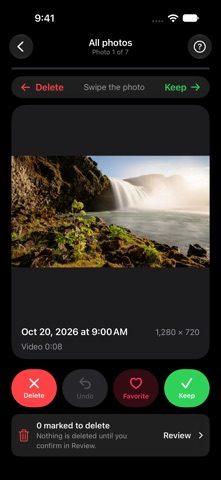
  • Swipe review — swipe through your library to keep, favorite, or mark items for deletion, undo a decision when you change your mind, and pick up a session later. Nothing is deleted until you confirm it in Review.
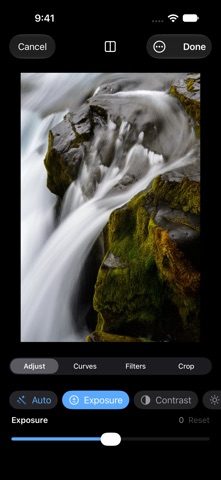
  • Bring out the best in every photo — quick improvements with Auto, or shape the image yourself with exposure, contrast, highlights, shadows, color, warmth, and sharpness; RGB curves, photographic filters, and cropping, rotation, and straightening. Compare your changes with the original as you work.
  • Non-destructive editing — edits use Photos’ non-destructive editing system, so you can always return to the original.
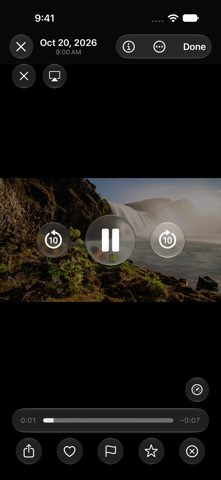
  • Enjoy photos and videos — a full-screen viewer with pinch and double-tap zoom, Live Photos, and native video playback with adjustable speeds, AirPlay, and Picture in Picture on supported devices.
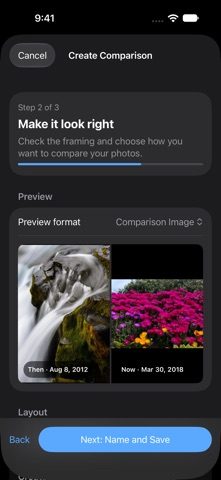
  • Then & Now — create comparisons from two meaningful photos: a side-by-side layout or an interactive slider, fine-tuned framing, then save or share your composition.
  • Rediscover — photo memories, your photo history, slideshows, and Home Screen widgets that bring selected photos and memories closer.
  • Built around your privacy — photo analysis runs on your device and PhotoFlow Studio does not track you. Favorites and albums stay connected to Photos, and supported organization data syncs through your private iCloud account.
  • Made for iPad — an adaptive sidebar and spacious layouts, plus Dark Mode, appearance options, and keyboard shortcuts.

Spend less time searching and sorting — and more time enjoying the moments you captured.

What’s new

Version 1.3

Smoother, faster and more polished.

Speed & stability

Today

Library

Collections

Polish

Download on the App Store $4.99

More from Modcast Studios